# Meet Inboundr
> Email was built for people. Inboundr rebuilds the receiving half for software — and for the agents you put in front of it.
Every email API can **send**. Almost none help you with the hard part —
*receiving* and understanding mail without hand-parsing MIME or babysitting a
mailbox.
**Inboundr is the inbox side of email, built to be operated by code.** Point a
domain at Inboundr and every address on it becomes a parsed, threaded inbox your
software can read — over a webhook, a REST call, or a native
[MCP](/integrations/mcp) tool your AI agent drives directly.
**Agent-native, not agent-compatible.** Reading a thread isn't an afterthought
bolted onto a receive-only API — it's a first-class
[MCP tool](/integrations/mcp), same as filtering with [Shield](/concepts/shield).
An agent can run its inbox without a line of glue code.
## One inbox, three ways in
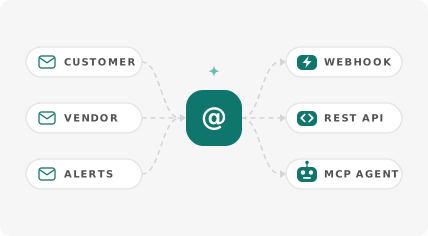
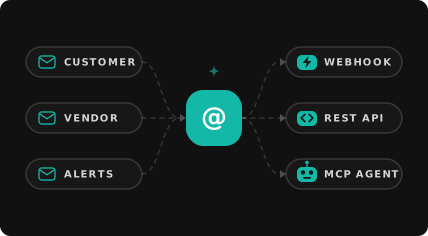
Inboundr sits between your code and everyone who mails it. Mail from any number
of senders funnels into one parsed, threaded inbox, which your software reads
over whichever of the three surfaces suits it — mix and match freely, since a
store-only inbox is always readable even while it also fires webhooks.
 Every address on your domain accepts mail without being created first, and each
message arrives parsed, threaded, and attributed to a conversation — see
[Receiving email](/guides/receiving-email).
A signed `email.received` event, the moment mail lands. Best for servers and
automations.
Poll and search a small, predictable JSON API. Best for scripts and
backends.
List, read, and thread as tools, plus filter with Shield. Best for agents
that act on demand.
## What you get that raw email doesn't
Clean JSON — text and HTML bodies, attachment metadata, and SPF/DKIM/spam
verdicts — instead of a MIME blob you have to decode yourself.
Inboundr threads inbound mail automatically using standard headers, so you
read a whole exchange in one call instead of stitching messages together.
Bring your own domain and keep full ownership. Catch-all means every address
works without pre-creating it.
Signed webhooks, exponential-backoff retries, and every attempt recorded in
the console.
## The shape of an integration
Most Inboundr projects come down to the same loop — the **agent inbox loop**:
Someone emails an address on your verified domain. Inboundr parses it and
stores it on a thread.
A webhook fires, or your agent calls `list_emails` / `get_thread`.
Route it, file it, alert on it — or filter it before it ever lands with a
[Shield](/concepts/shield) rule.
Everything else in these docs is a detail of that loop.
## Start here
Domain to first parsed email in a few minutes.
The mental model behind domains, routing, and inboxes.
Wire an agent to its own inbox over MCP.
Every endpoint, parameter, and response.
Every address on your domain accepts mail without being created first, and each
message arrives parsed, threaded, and attributed to a conversation — see
[Receiving email](/guides/receiving-email).
A signed `email.received` event, the moment mail lands. Best for servers and
automations.
Poll and search a small, predictable JSON API. Best for scripts and
backends.
List, read, and thread as tools, plus filter with Shield. Best for agents
that act on demand.
## What you get that raw email doesn't
Clean JSON — text and HTML bodies, attachment metadata, and SPF/DKIM/spam
verdicts — instead of a MIME blob you have to decode yourself.
Inboundr threads inbound mail automatically using standard headers, so you
read a whole exchange in one call instead of stitching messages together.
Bring your own domain and keep full ownership. Catch-all means every address
works without pre-creating it.
Signed webhooks, exponential-backoff retries, and every attempt recorded in
the console.
## The shape of an integration
Most Inboundr projects come down to the same loop — the **agent inbox loop**:
Someone emails an address on your verified domain. Inboundr parses it and
stores it on a thread.
A webhook fires, or your agent calls `list_emails` / `get_thread`.
Route it, file it, alert on it — or filter it before it ever lands with a
[Shield](/concepts/shield) rule.
Everything else in these docs is a detail of that loop.
## Start here
Domain to first parsed email in a few minutes.
The mental model behind domains, routing, and inboxes.
Wire an agent to its own inbox over MCP.
Every endpoint, parameter, and response.